1Why Recurring Payments Are So Hard to Track
Your Netflix charges a credit card, your phone bill runs on UPI autopay, cloud storage renews through Google Play, and insurance debits from your bank account. Each platform has its own billing cycle, notification system, and cancellation process - and no single statement shows you the full picture. Manual tracking is time-consuming and error-prone - most people miss 2-3 active charges when they try to list them from memory.
As we explored in our guide on why autopay causes silent overspending, the automation that makes payments convenient also makes them invisible. When charges are invisible, they are easy to forget - leading to the kind of hidden subscriptions that quietly drain your bank account.
Did you know? The average Indian household has 8-12 active recurring payments spread across different platforms - from streaming services and mobile recharges to insurance premiums and SaaS tools. Most people can only recall about half of them when asked.
The core challenge is not discipline - it is visibility. The following sections walk you through exactly how to find every recurring charge across each major payment channel.
2How to Find Recurring Payments on Credit Cards
Credit cards are the most common payment method for subscriptions, but statements mix one-time purchases with recurring charges, making it hard to isolate what repeats. Follow these steps to identify all recurring charges:
- Download your last 3 months of statements from your bank's net banking or mobile app. Multiple months make recurring patterns easier to spot.
- Filter for repeating amounts and merchants. Common recurring merchants include Google, Apple, Amazon, Netflix, Spotify, Adobe, and telecom providers.
- Check your card's "Standing Instructions" or "Recurring Payments" section to see which merchants are authorized to charge automatically.
- Contact your bank if you cannot find a clear list - ask for all active recurring mandates or standing instructions on your card.
Note down each merchant name, amount, and billing date. This becomes the first layer of your recurring payments inventory.
3How to Find Recurring Payments via UPI AutoPay
UPI AutoPay (also called UPI mandates) is now used for SIPs, insurance premiums, loan EMIs, OTT subscriptions, and gym memberships. The challenge is that mandates are spread across whichever UPI app you used to set them up. Here is how to check across major platforms:
Google Pay: Tap your profile picture, go to "Settings," then "Automatic payments" to see all active mandates.
PhonePe: Go to "My Money," then "UPI Mandate" or "AutoPay" to view and manage all mandates.
Paytm: Navigate to "Passbook," then "UPI," and look for "AutoPay" or "Mandates" for active recurring setups.
NPCI website: Visit npci.org.in and use the UPI mandate lookup with your registered mobile number.
For a complete deep dive, read our guide on how to check all UPI AutoPay mandates in one place.
4How to Find Recurring Payments in Digital Wallets
Digital wallets like Paytm Wallet and Amazon Pay have their own autopay mechanisms separate from UPI. Because wallet transactions often do not appear on your bank statement, they are the easiest recurring charges to lose track of. Here is how to audit them:
Paytm: Go to "Passbook" then "Subscriptions" or "AutoPay." Review active subscriptions charged to your wallet or linked payment methods.
Amazon Pay: Go to "Your Account," then "Amazon Pay," and look for "Recurring Payments." Amazon Pay is used for many third-party services.
Other wallets: Check Freecharge, MobiKwik, and apps like CRED, which may manage card-based recurring payments on your behalf.
5How to Track App Store and Play Store Subscriptions
App subscriptions are sneaky because they are billed through Apple or Google rather than the service provider. The charge on your statement says "Apple" or "Google" instead of the actual app name. Here is how to find them on both platforms:
iOS App Store: Open Settings, tap your name, then "Subscriptions." You will see every active and expired subscription billed through Apple with renewal dates.
Google Play Store: Open Play Store, tap your profile, then "Payments & subscriptions" and "Subscriptions" to see all active subscriptions with billing dates.
Check both platforms: If you use both Android and iOS, or have switched platforms, check both stores. Old subscriptions may still be billing.
Review family sharing: If you are part of a family group on Apple or Google, check for shared subscriptions billed to your account as organizer.
Pay special attention to free trial conversions. Many apps offer a 7-day or 30-day trial that silently converts into a paid subscription you may never use beyond the trial.
6Building a Single Recurring Payments Dashboard
Now that you know where to find recurring payments across each channel, the next step is consolidating everything into a single view. Without this centralized dashboard, you will keep discovering forgotten charges every few months.
Your dashboard should capture the following for each payment:
- Service name and category
- Monthly or annual amount
- Payment method (card, UPI, wallet)
- Billing date and next renewal
- Auto-renew status (on or off)
- Whether you actively use the service
Review for duplicates and unused services. After identifying what to cut, use our step-by-step checklist for cancelling unwanted subscriptions and autopays to cancel them properly across every platform.
7Automating the Process with TrackAutoPay
Manual auditing works as a one-time exercise, but recurring payments change constantly - new subscriptions get added, prices increase, and free trials convert. To stay on top of everything, you need a system that makes ongoing tracking effortless.
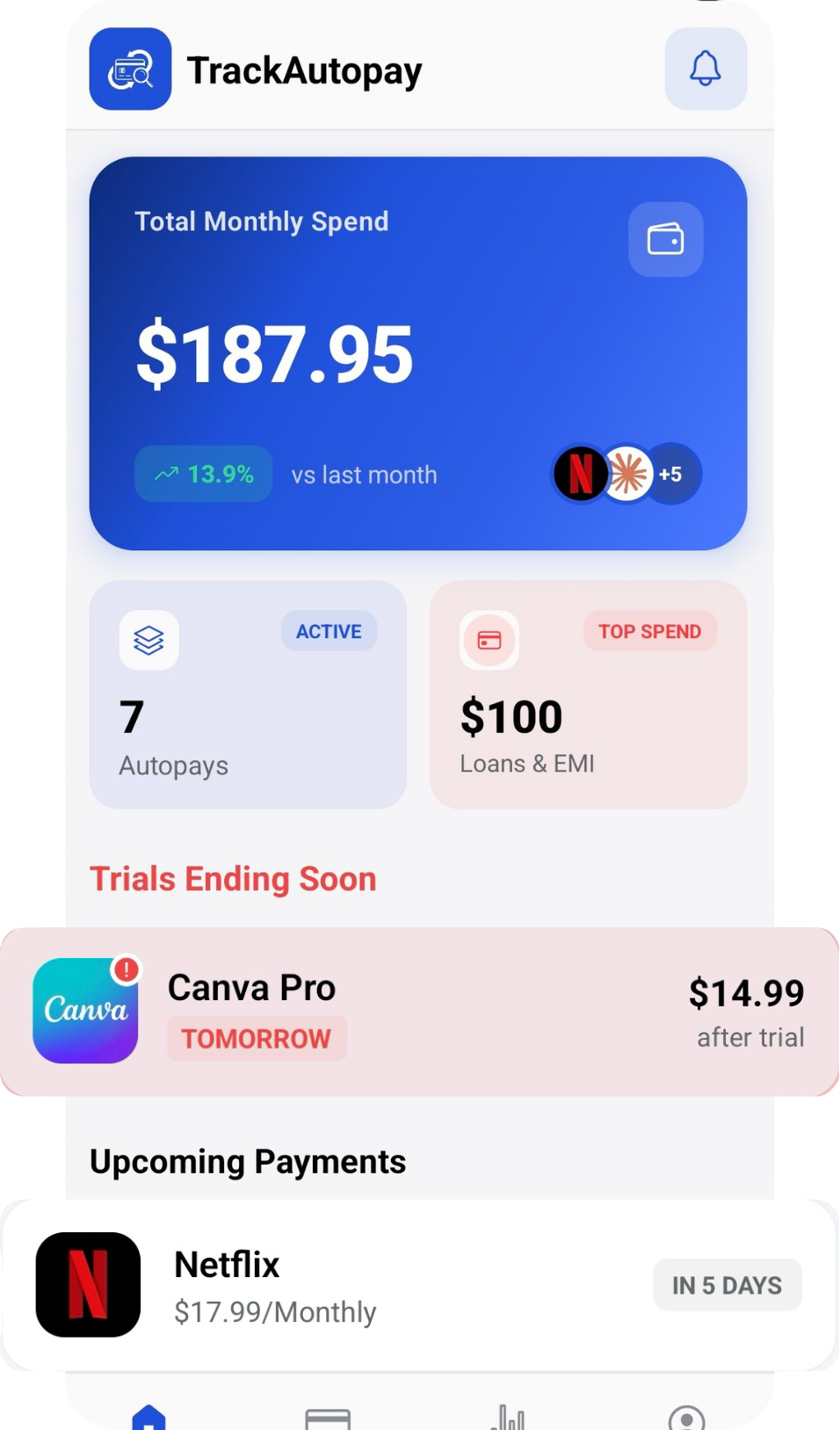
TrackAutoPay provides a single dashboard where you can add and organize all recurring payments regardless of payment method. Instead of checking five apps monthly, you maintain one centralized list with renewal reminders and spending summaries. For a comparison of tools, see our roundup of the best subscription tracker apps in India.
- Add autopays from any payment source
- Get renewal reminders before charges hit
- View total monthly recurring spend at a glance
- Organize by category, amount, or billing date
Track Every Recurring Payment in One Place
Stop checking five apps. Add all your recurring charges to one dashboard and never miss a renewal again.